The Invisible Participant
By late 2023, there were already a bunch of AI meeting assistants out there. Otter, Fireflies, Fellow — all of them could transcribe, summarize, pull out action items. Most of them did that pretty well. But none of them asked if that was okay.
Otter just shows up in your Zoom call as a user. The recording's already started by the time anyone sees the notification. For someone who joined late, or a client who wasn't expecting it — they have no idea what's happening to what they're saying. And for teams where consent actually matters culturally, this isn't a minor thing.
There's also just a lot of wasted effort that happens between meetings. New stakeholders need briefings. Action items live in three different tools. People send Slack messages asking what was decided, when the answer is sitting in a transcript nobody's read. The existing tools chip away at that — but they create a different problem by entering professional conversations without any kind of trust established first.
We wanted to build something where consent wasn't an afterthought buried in settings. Trust had to be part of how it worked from the start.
Competitive Analysis
Before touching any UI, we looked at what was already out there — the three tools with the most traction. Not to just list what was wrong with them, but to figure out exactly what none of them were doing.
| Tool | Key Features | Core Gap | How Freddy addresses it |
|---|---|---|---|
| Otter.ai | Real-time transcription, summary, share & analysis | Joins as a meeting attendee and begins recording before participants are informed — consent is entirely absent from the design | A consent notice appears immediately for every participant, every meeting, every time. No auto-dismiss. |
| Fellow | Auto-joins all meetings, embeds recordings into notes, AI-generated post-meeting summaries | Pricing model makes it inaccessible for small teams and independent consultants | Designed as a multi-platform tool with feature parity across team sizes, no gated tiers for core AI features |
| Fireflies | Real-time capture, variety of pricing options, good for simple transcripts | Transcription quality degrades sharply with accents and technical domain language — unreliable for international or specialized teams | Google Cloud Speech-to-Text with NLP post-processing, with a language toggle built directly into the transcript view |
The moment that kept coming up: someone joins a call mid-meeting and realizes they've already been recorded. Nobody warned them. Nobody asked. None of the tools we looked at had designed for that. We made it the center of everything.
Design Process
We spent the first stretch just mapping the problem before opening Figma. When we brainstormed everything that goes wrong in and around meetings, six clusters kept coming up. Each one basically became its own feature brief.
- Tools join silently without notice
- Recording starts before users opt in
- Privacy concern for clients & guests
- Led to: Consent popup at meeting start
- New members need 30-min briefings
- Late joiners miss key decisions
- No structured recap across tools
- Led to: AI summary + chatbot Q&A
- Action items live in 3 different tools
- Deadlines mentioned but never logged
- Follow-up falls on memory alone
- Led to: Task extraction + calendar sync
- Conversations derail from agenda
- No signal when time is being lost
- Host reluctant to interrupt senior members
- Led to: Agenda enforcement alerts
- Transcripts sit unread in shared drives
- Searching meeting content is manual
- Summaries too long to skim quickly
- Led to: AI insights panel + chatbot
- Writing recap emails takes 20+ minutes
- No link between meeting and next steps
- Action items repeat across meetings
- Led to: @freddy generate follow-up email
From there we mapped the full information architecture before touching any individual screens. Four main surfaces — My Meetings, Calendar, Schedule Meeting, Tasks. We wanted to understand the whole system first.
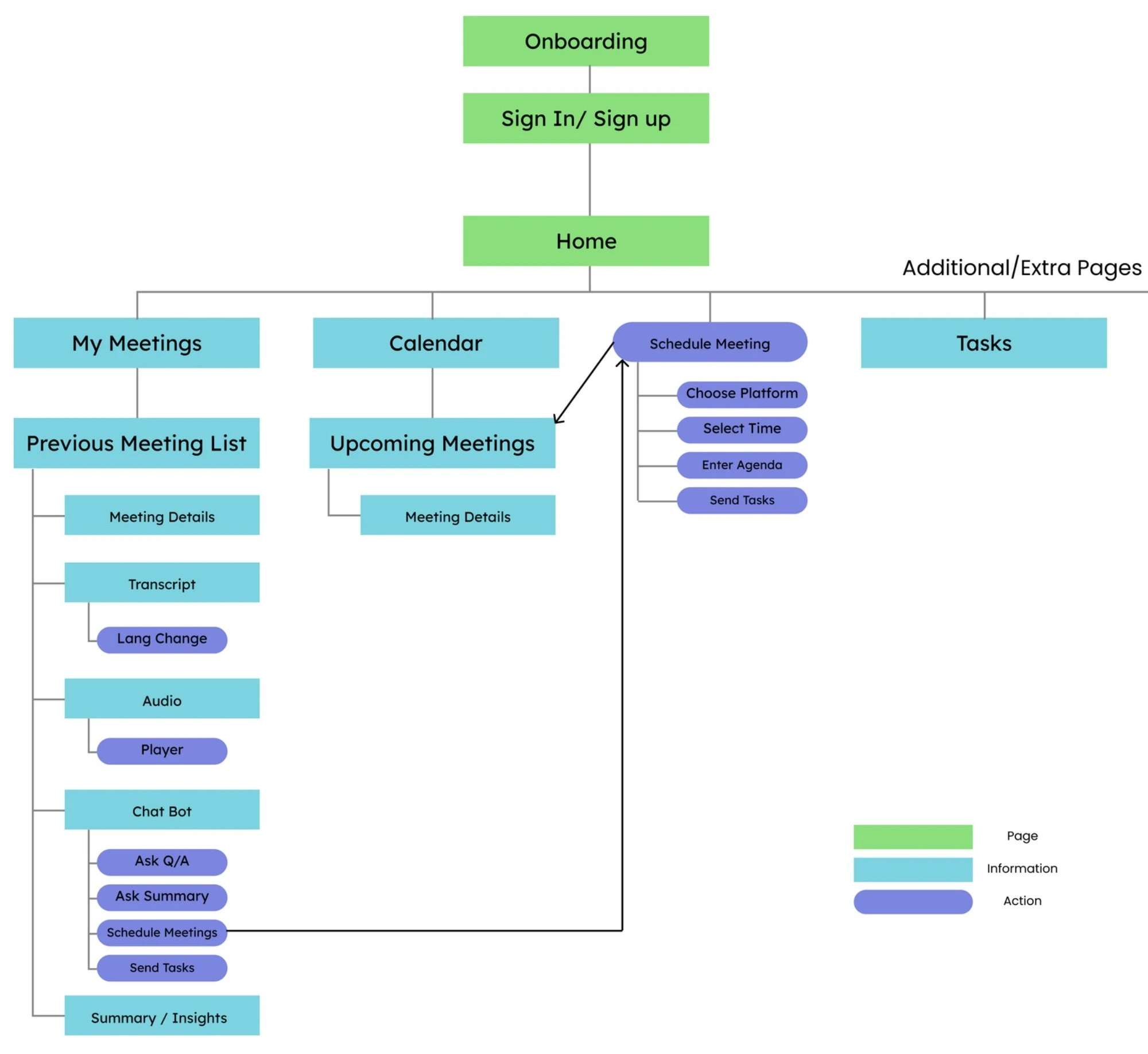 Information architecture — four primary surfaces mapped before any screen design began
The Design Approach
We split the design into three phases — before, during, and after. One rule kept coming up across all three: Freddy should make your life easier, not give you one more thing to deal with. Every feature got checked against that.
Phase 1 — Pre-Meeting
The whole scheduling flow is inside Freddy. You pick your platform, set the time, add participants, write an agenda — done, without leaving the app. Freddy handles the calendar sync, availability check, invites, and RSVP tracking.
The agenda isn't just a text field. Freddy actually uses it throughout the meeting — to notice when the conversation drifts, to structure the post-meeting summary, and to keep the chatbot grounded in what was actually said.
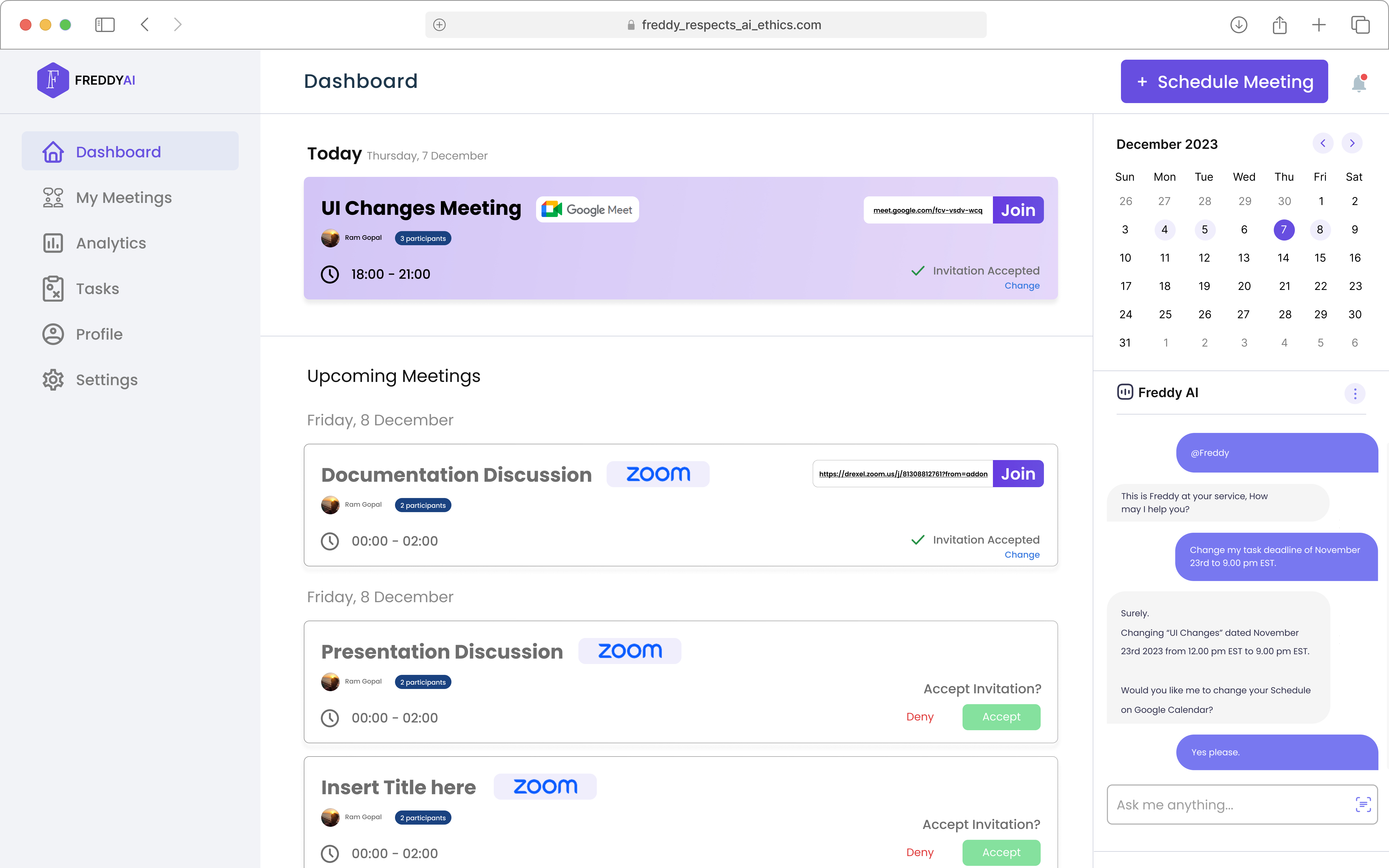 Pre-meeting — platform selection, agenda setup, and participant management in a single flow
Phase 2 — During the Meeting
The Consent Notice
When Freddy joins, everyone sees it immediately: "This meeting is being recorded for Freddy AI purposes. The following data is collected: meeting recording, participant name, participant email." It doesn't auto-dismiss after two seconds. It's not hidden in account settings. Every participant, every meeting. By the time most people notice Otter is recording, it's been going for five minutes.
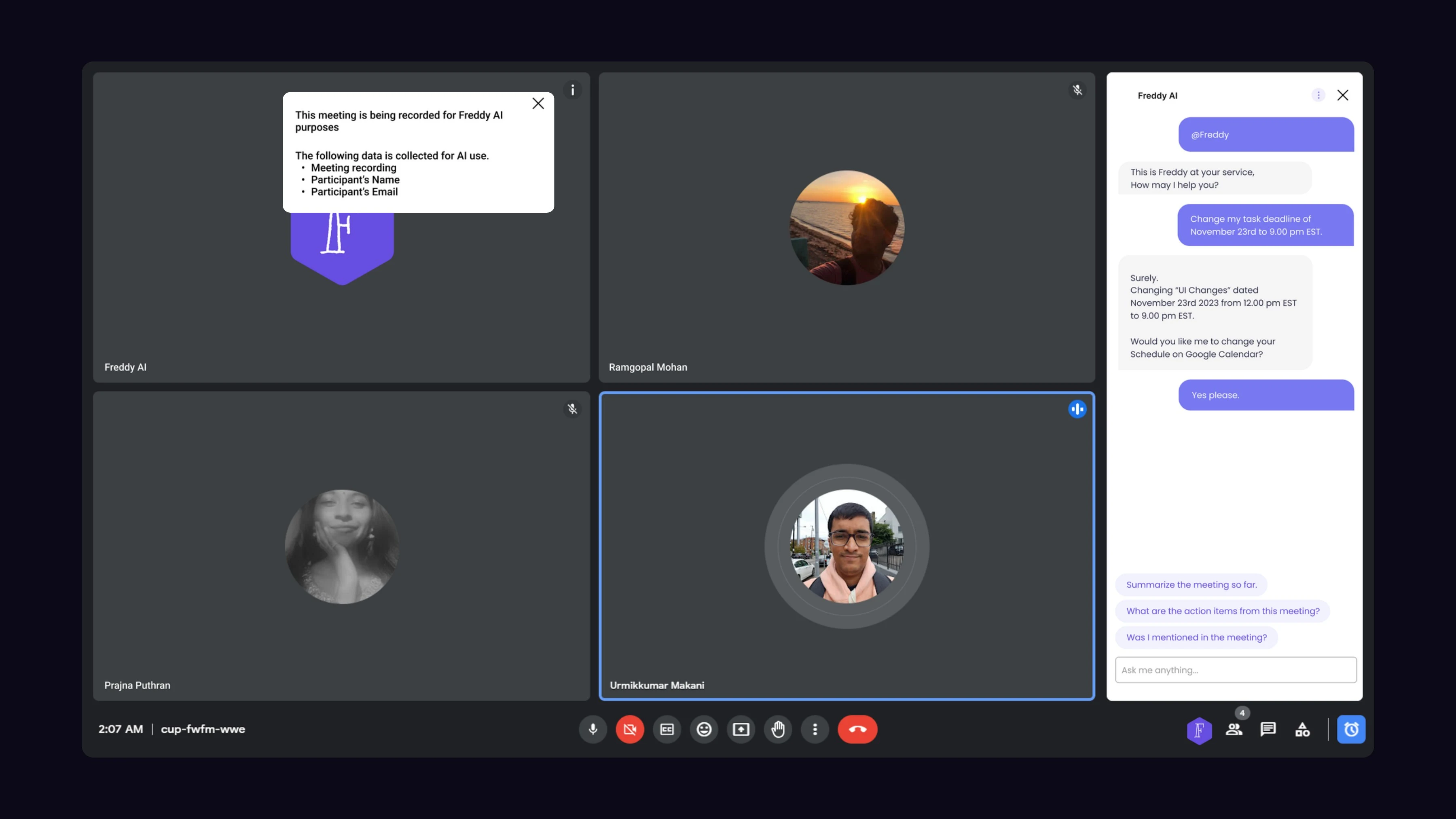 During the meeting — consent notice shown to every participant the moment Freddy joins. Cannot be dismissed without acknowledgement.
Meeting is going out of conversation
When the conversation goes off topic, Freddy surfaces a small notification with two options: "Stop Reminders for this meeting" or "Keep recommending." The host doesn't have to interrupt anyone — Freddy flags it and backs off immediately. We didn't see this anywhere in our competitive research. It's what makes Freddy something other than a fancier transcription service.
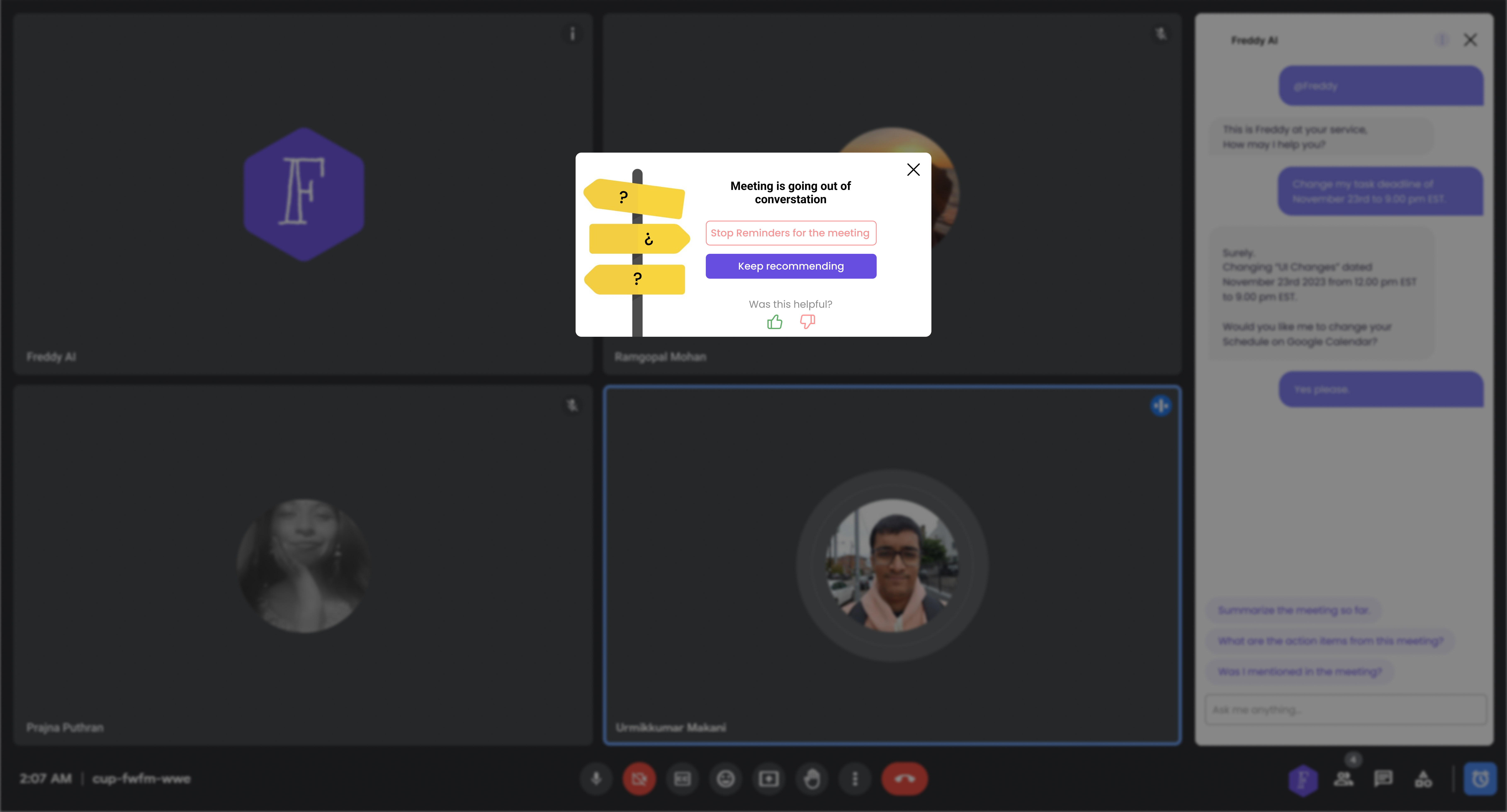 Agenda enforcement — a non-blocking alert with two options: stop reminders entirely, or keep recommending
Phase 3 — Post-Meeting
After the meeting, everyone gets a dashboard with the full transcript, a topic-by-topic AI summary, extracted action items with suggested deadlines, and a chat interface where you can actually do things with the content.
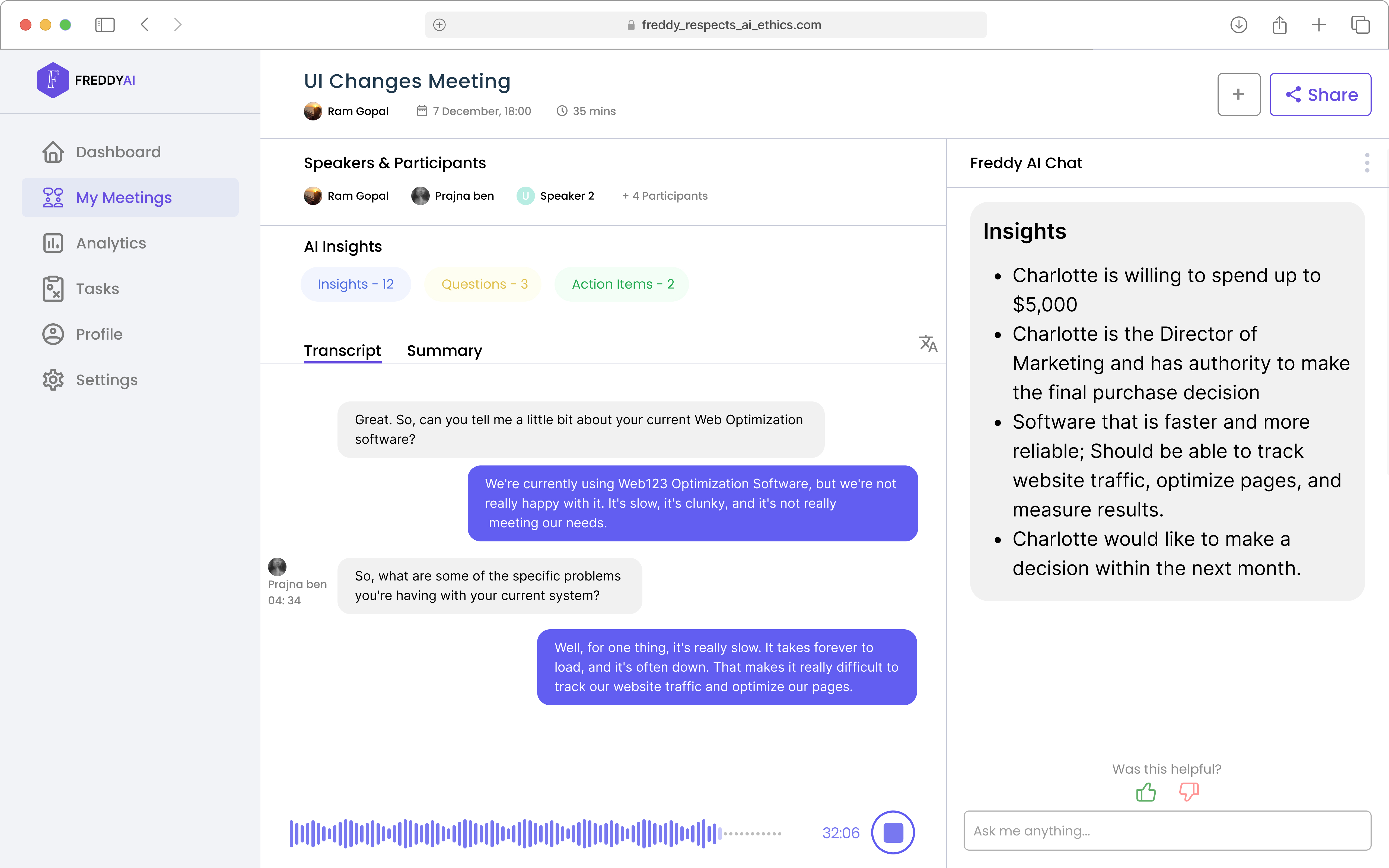 Post-meeting — transcript view with AI insights: key decisions, action items, and participant details extracted automatically
The follow-up email came up the most in every demo. You type @freddy generate a follow-up email and it drafts one from the actual transcript. It can only pull from what was said in that meeting — not from anywhere else. That was a deliberate call.
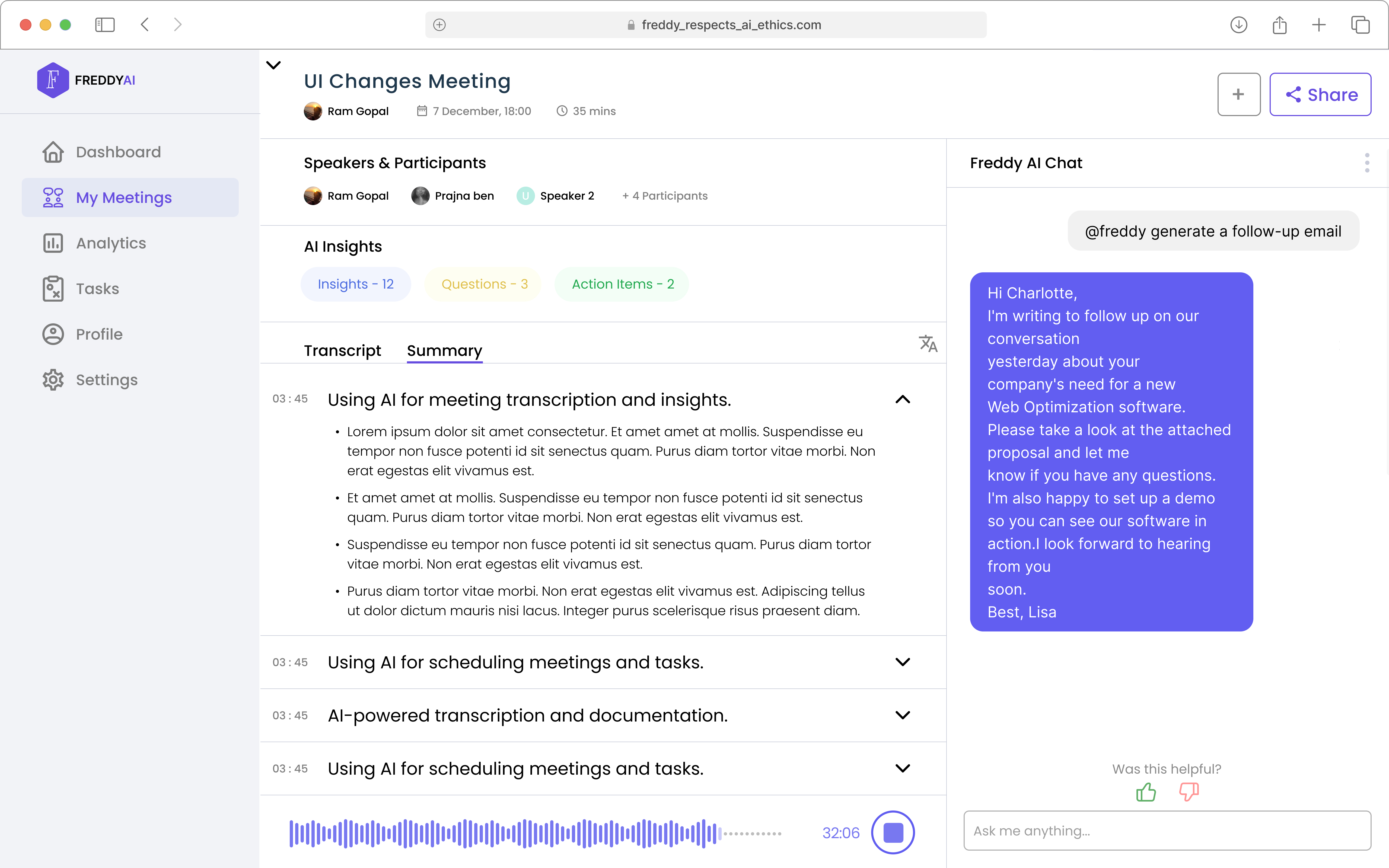 Summary tab — topic-grouped meeting summary and AI-drafted follow-up email on demand
Technical Architecture
Voiceflow handled the whole conversational layer. The task scheduling flow was the most complicated part — it had to parse natural language, extract a date, check calendar availability, and confirm back with the user, all inside one chat thread.
From spoken deadline to calendar event — automatically
When Freddy picks up a task assignment in the transcript, it pulls out the deadline reference. A custom JavaScript block in Voiceflow takes whatever someone said — "by end of next week," "December 28th" — and converts it to a structured date. Freddy shows the extracted date to whoever it's assigned to, proposes available slots, and once confirmed, writes it straight to Google Calendar. Nobody leaves the chat.
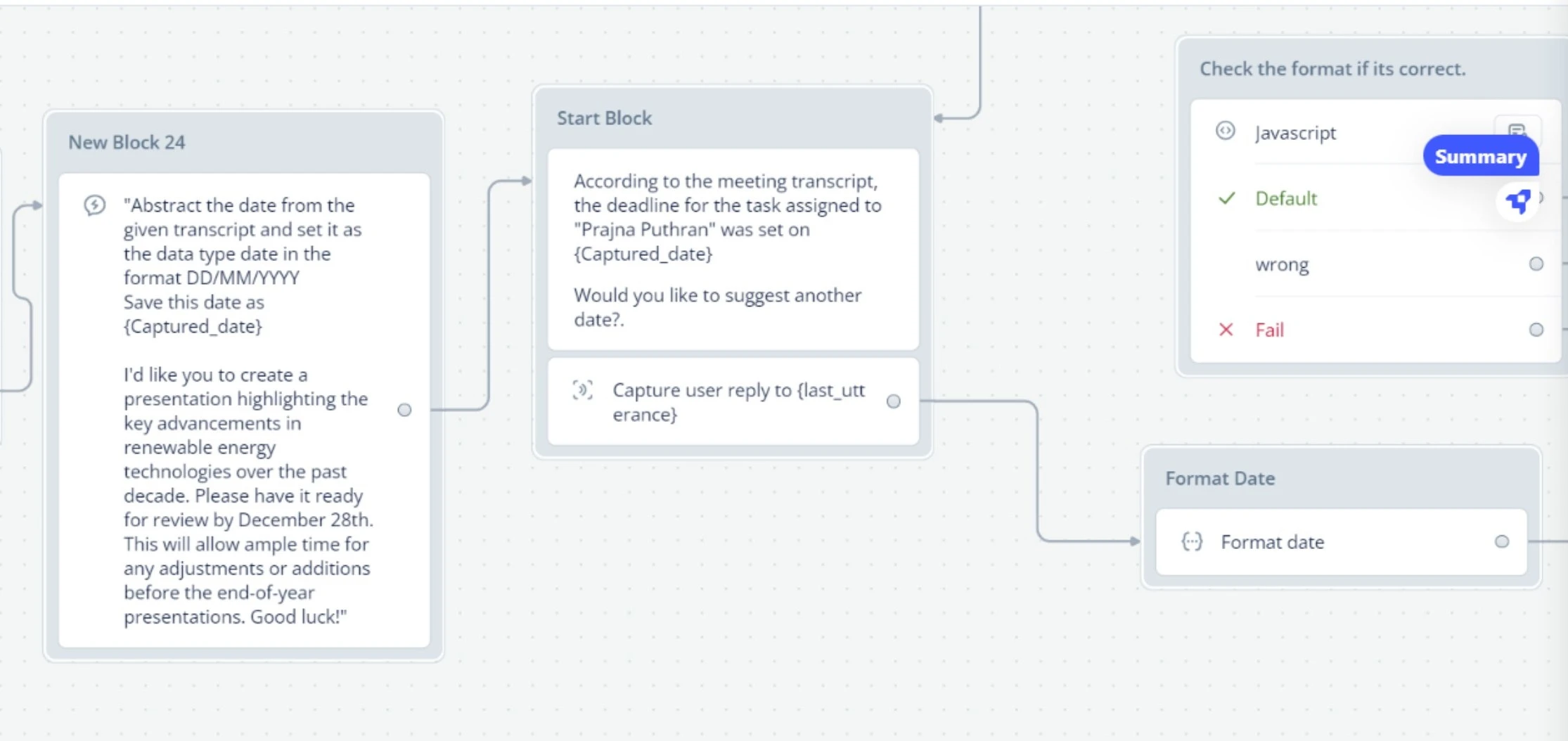 Voiceflow implementation — the task extraction pipeline: transcript analysis → date parsing → availability check → calendar write
- Audio Ingestion & NLP: Live audio is captured and passed to Google Cloud Speech-to-Text. The transcribed text runs through natural language processing to identify named entities and perform VADER-based sentiment analysis.
- Task Extraction: When the system identifies a task assignment, Voiceflow extracts the deadline reference. Custom JavaScript blocks parse natural language date expressions into structured date objects.
- Calendar Sync: Freddy surfaces the extracted task to the relevant participant for confirmation. Once confirmed, it writes the event directly to Google Calendar without the user leaving the chat thread.
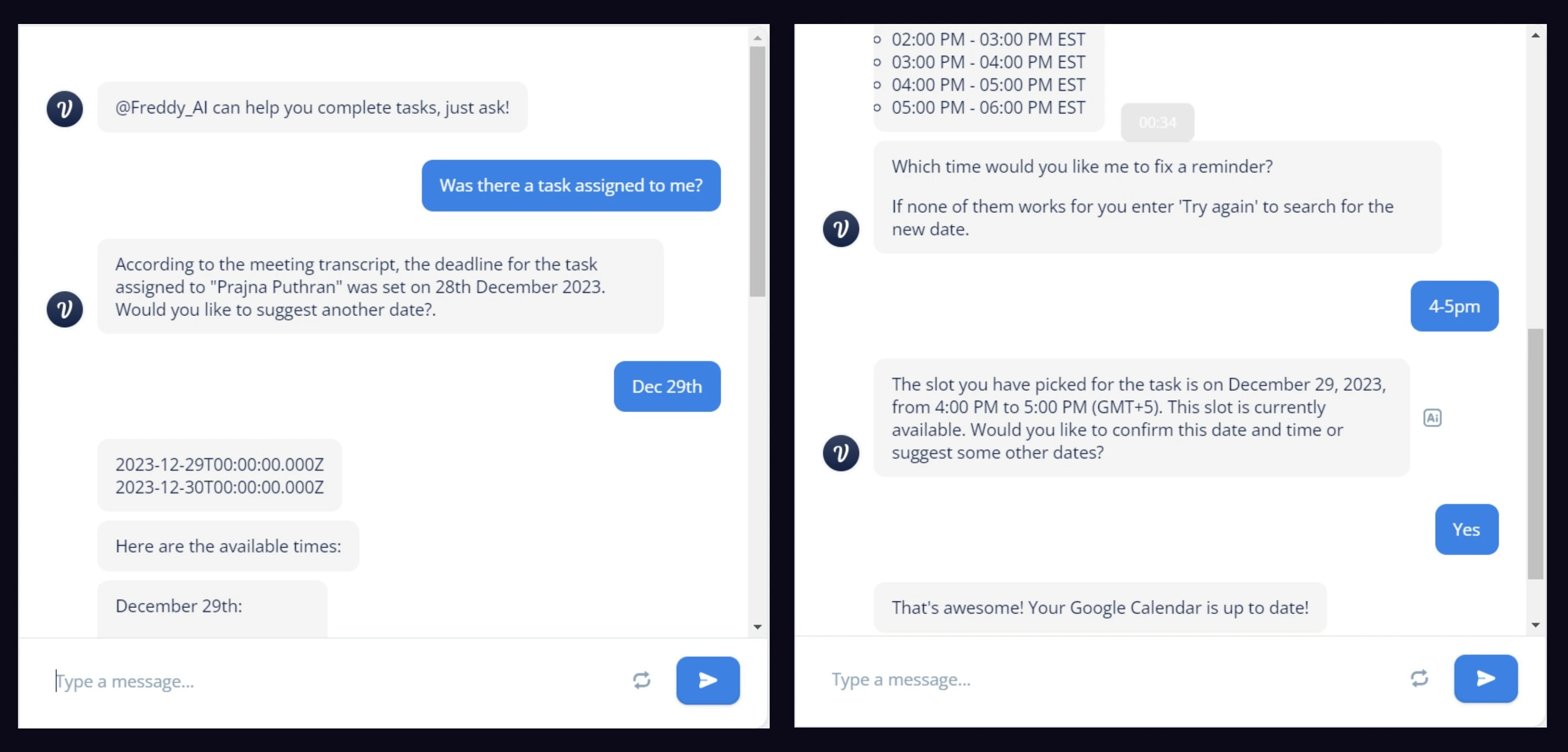 End-to-end task scheduling — Freddy proposes available slots, user confirms, Google Calendar updates automatically
The Ethics Layer
For this project we used Microsoft's 18 Guidelines for Human-AI Interaction as an actual design constraint — not something we checked against at the end of the semester. A lot of them shaped specific decisions directly. Hover any guideline to see how we handled it, or why we didn't.
Freddy: Onboarding and the consent popup explicitly list every capability and every data type collected. No hidden features.
Freddy: AI summaries are framed as drafts for human review, not authoritative outputs. Transcription limitations are disclosed upfront.
Freddy: Agenda drift alerts only fire when conversation meaningfully diverges — not constantly. Freddy reads context before interrupting.
Freddy: The AI insights panel surfaces details from the current meeting only — never generic suggestions.
Not in scope — Cultural variation in meeting etiquette wasn't designed for. A gap for the next version.
Not in scope — Transcript analysis doesn't account for dominant-speaker dynamics or seniority bias in extracted insights.
Freddy: The @freddy trigger summons the AI precisely when needed — emails, scheduling, Q&A — without it being persistently active.
Freddy: "Stop Reminders for this meeting" dismisses agenda alerts instantly with one tap.
Freddy: Transcripts are editable, summaries can be regenerated, action items dismissed. Freddy drafts — humans decide.
Freddy: The chat bot only draws from the current meeting transcript — no speculation, no external sources.
Freddy: The consent popup states exactly what data is collected and why. "Was this helpful?" lets users flag unexplained AI decisions.
Not in scope — Freddy has no persistent memory across sessions. Each meeting starts fresh. Cross-session memory is a V2 priority.
Not in scope — No personalization engine. Preferences reset each session in the current prototype.
Not in scope — The system doesn't adapt from historical patterns. Requires persistent memory that V1 doesn't have.
Partially — Thumbs up/down captures binary signal only. What specifically was wrong wasn't implemented.
Freddy: Before any calendar sync, Freddy shows the exact slot being booked and asks for explicit confirmation.
Freddy: Users can pause recording, disable insights, and stop all agenda reminders from settings.
Freddy: Every participant sees the consent notice at meeting start. No silent state changes — if Freddy is recording, everyone knows.
The harder questions we didn't resolve
Some questions came up that we genuinely couldn't answer. If Freddy gets a summary wrong, who fixes it and whose responsibility is that? If a senior person sets up agenda enforcement and a junior person's comment gets flagged — is the AI doing something a person shouldn't be able to do unilaterally? We didn't solve those. We documented them instead of pretending they weren't there.
Reflection
Freddy is the project I'm most proud of academically, and the one I'm most critical of as a designer.
What worked: Using the Microsoft guidelines as actual design constraints, not just something to cite. It forced real decisions. The consent popup is a simple thing but no commercial tool had done it right, and I think it's because nobody was treating it as a design problem — just a legal one.
What I'd do first next time: Get this in front of actual users. We never did. I have no idea if the consent notice felt reassuring or alarming to someone seeing it for the first time. I don't know if the agenda alerts felt useful or condescending. Those are real questions we skipped.
What the next version needs: Cross-session memory so Freddy learns your team's patterns over time. Personalization for summary styles and alert thresholds. Local processing for teams in sensitive industries. Better speaker identification across accents. Building consent-first from the start is easier than going back and adding it to something that wasn't designed around it.
What I'd bring to every project: Using ethics as a constraint, not a final section. Every time we had to justify a decision against a specific guideline, it made the reasoning sharper. Instinct wasn't enough on its own. I want to keep doing that.
Next Case Study
Design for Elderly →